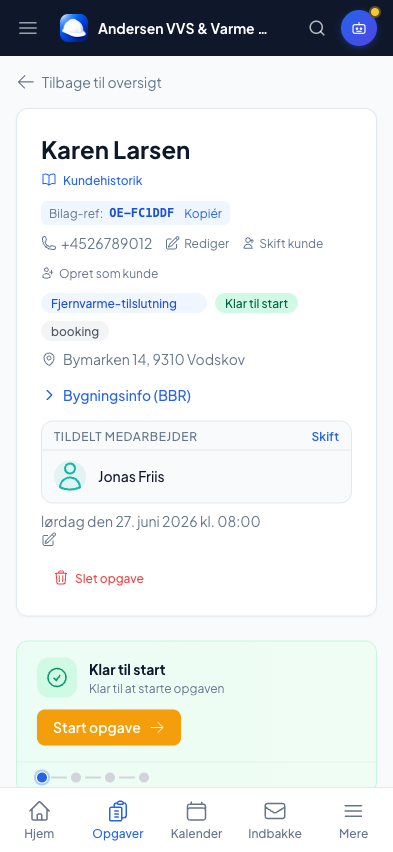
Everything about the job in one place — for the crew on site too
Phases, photos, materials, mileage and who’s on the job. The crew has it all in the employee app, and the customer can follow along live.
✓ Phases & progress✓ Photos before/during/after✓ Customer follows along live
See it live — click around the demoOne case — everything connected
Break the job into phases, assign the crew, and mark things done as you go. Quotes, invoices, materials, hours, mileage, QA reports and photos all sit on the same case — nothing is typed twice.
- List or board view (drag-and-drop)
- Phases from templates or AI suggestions
- Photos before/during/after gathered on the case
QA reports with photo and signature
Document the work with checklist reports: result, status, notes and a photo per item, signed digitally and archived. Ready when the customer, the site management or the insurer asks.
This is what the customer’s side looks like
The AI tells the difference between an emergency water leak, a planned inspection and a 6-week project — and gives every customer the right experience fully automatically. You click nothing.
Example
Water under the kitchen sink
Today · same day
The customer gets
- Live GPS position of the craftsman
- Message: "Mads is 12 min away"
- Message the craftsman directly
- SMS when the status changes
The AI does it automatically: We read the customer’s description, photos and history and suggest the job type in under 2 seconds. You always have the final word and can change it with one click.
Mads is on the way to you
Arriving at 14:22 · 12 min
Live position updates every 30 sec.
Map with live position
Message the craftsman
Write here — you get a reply straight from Mads.
Would you rather talk to us first? Call 93 94 12 06
Recurring service agreements run themselves
Set an interval (annual service, half-yearly inspection), and the system generates the bookings automatically and assigns them to an employee. You never forget a service visit — even ones two years out.
From notes and phone calls to one case everyone can see
How it works today
- Jobs live on notes, in your head and across five apps
- The journeyman calls to ask what needs doing
- Photos are scattered on private phones
- The customer calls: “when are you coming?”
- QA documentation is done afterwards — if it gets done
With Online Erhverv
- Each case gathers quote, hours, materials, photos and people
- The journeyman sees the job, the phases and the route in the app
- Photos before/during/after upload straight to the right case
- The customer follows along live on a private link
- A QA report with photo and signature, while you’re on site
The whole case — from site visit to completed
Nothing is typed twice. Everything that happens on a job is connected in one place.
List or board view with drag-and-drop between phases.
Break into phases, assign one or more journeymen, mark done.
Measurements, photos and notes — can become a quote with one click.
Upload from the app, before/after slider and a gallery per customer.
Checklist with result, photo and digital signature, archived.
Recurring bookings generated automatically on your interval.
All bookings on a timeline, with a DMI rain forecast for outdoor jobs.
Save typical jobs with duration, notes and phases — ready to reuse.
Assign a trailer or tool to a booking, so the journeyman knows what to bring.
Status, technician card, phase progress and ETA on a private link.
The customer can move the time themselves within your free slots.
Repeat jobs are created in seconds from an earlier case.
Missing a drawing, a measurement or a photo? Send a request — the customer uploads via a link and you get notified.
“My journeymen no longer call to ask what to do. They open the app, see the case and get going. It saves me an hour every single morning.”
Frequently asked questions
The questions tradespeople ask most before getting started. Missing yours? Call or write — you’ll talk to a real person who knows the trade.
Frederik will happily show you what it would look like for your business — free, no sales talk.
Which app gathers phases, photos and hours on a case?
Online Erhverv gathers phases, photos before/during/after, materials, mileage, QA reports and people on the same case. The crew has it all in the employee app.
Can I break the job into phases?
Yes. Use phases from templates, your own, or AI suggestions, assign each phase to one or more journeymen, and mark them done as you go. You can view jobs as a list or as a board with drag-and-drop.
Can the customer follow along on the job?
Yes. The customer sees status, technician, photos and estimated arrival on a private link — no login, and no need for you to call and update. Internal notes and prices are never visible to the customer.
How do I document the work for the customer, insurer or site management?
With QA reports: checklist items with result, status, notes and a photo per item, signed digitally and archived. Photos before/during/after sit together on the case, ready when asked.
Can the crew see and update the job from their phone?
Yes. In the employee app they see the day’s jobs and routes, start a timer (server stopwatch), upload photos, request materials and mark phases done — without calling the office.
Can I set up recurring service agreements?
Yes. Set an interval (e.g. an annual inspection), and the system generates the bookings automatically and assigns them to an employee — even ones two years out.
Works together with
Your whole trade business — one system
Try it free for 90 days. No commitment, no credit card. You’re up and running in 10 minutes.
90 days free — from 995 DKK/mo. excl. VAT